

Contributed by Jess Wang on 2026-07-28
Outcome evals tell you whether an agent got the final answer right. But a modern agent can work for a long time and make hundreds of decisions on the way to that answer, and a correct result can still come from a broken process.
To build agents you can trust, you have to supervise the process, not only the result. In this cookbook, you’ll use behavior specs, an open standard for defining how an agent should behave across a trajectory, and turn each behavior into a standing eval in Braintrust that grades whole trajectories true, false, or NA.
You’ll build a small coding agent and hold it to the verify-before-done spec. Before the agent claims a task is done, it should run the project’s tests against the current code and read the result.
By the end of this guide, you’ll learn how to:
- Write a
BEHAVIOR.mdbehavior spec that captures how an agent should gather evidence, decide, act, and recover - Keep the spec out of the agent’s runtime context so the eval measures behavior the agent produces on its own
- Run the agent and trace every trajectory in Braintrust
- Judge each behavior over the trajectory with an LLM judge that returns
true,false, orNA - Read the verdicts, find the behavior that failed, and iterate on the agent, not the spec
Getting started
You’re building a coding agent that operates on a tiny project. It can read files, write files, and run the project’s tests, and its task is to fix a bug. Writing the fix is the easy part. The behavior being tested is whether the agent verifies the fix by running the tests before it reports the task done. You’ll need:- A Braintrust account with an API key
- An AI provider like OpenAI, configured in your Braintrust account’s AI providers settings, so calls can route through the Braintrust gateway
- Node.js 20+
.env.local file:
BRAINTRUST_API_KEY powers both the agent and the judge, and every call is traced automatically.
Writing the behavior spec
A behavior spec is a plain Markdown file with YAML frontmatter. It describes how the agent should behave in specific situations, written so a person or a judge can read a trajectory and tell whether the behavior happened. It is not a prompt, and it is never shown to the agent. By convention, specs live under.agents/behaviors/, one directory per spec, each containing a file named BEHAVIOR.md:
## heading is one behavior the judge grades on its own. Write each one so a reader can check it against a trajectory, using a few labeled parts. State the intent behind the behavior, the evidence that shows whether it happened, the decision the agent should make, how it should execute and recover, and the failure modes that count as a violation. The verify-before-done spec has two behaviors. Here is the frontmatter and the first behavior:
## behaviors check two different things, and the judge grades each on its own:
- Run the check against the current code before reporting done asks whether the agent ran the tests against its latest edit before declaring the task done.
- Only claim success when the check passes asks whether the agent claimed success only on a pass, and reported the change as unverified when the check could not run.
.agents/behaviors/verify-before-done/BEHAVIOR.md. Because the eval builds one scorer per ## section, these two behaviors become the two score columns you’ll see in the results.
Keep the spec sparse. Elevate the few behaviors you care about enough to measure, and leave everything else in your prompts, tools, and skills where it already lives. To validate specs and scaffold new ones, the agentbehavior repo ships a CLI validator and a portable authoring skill.
Building the agent
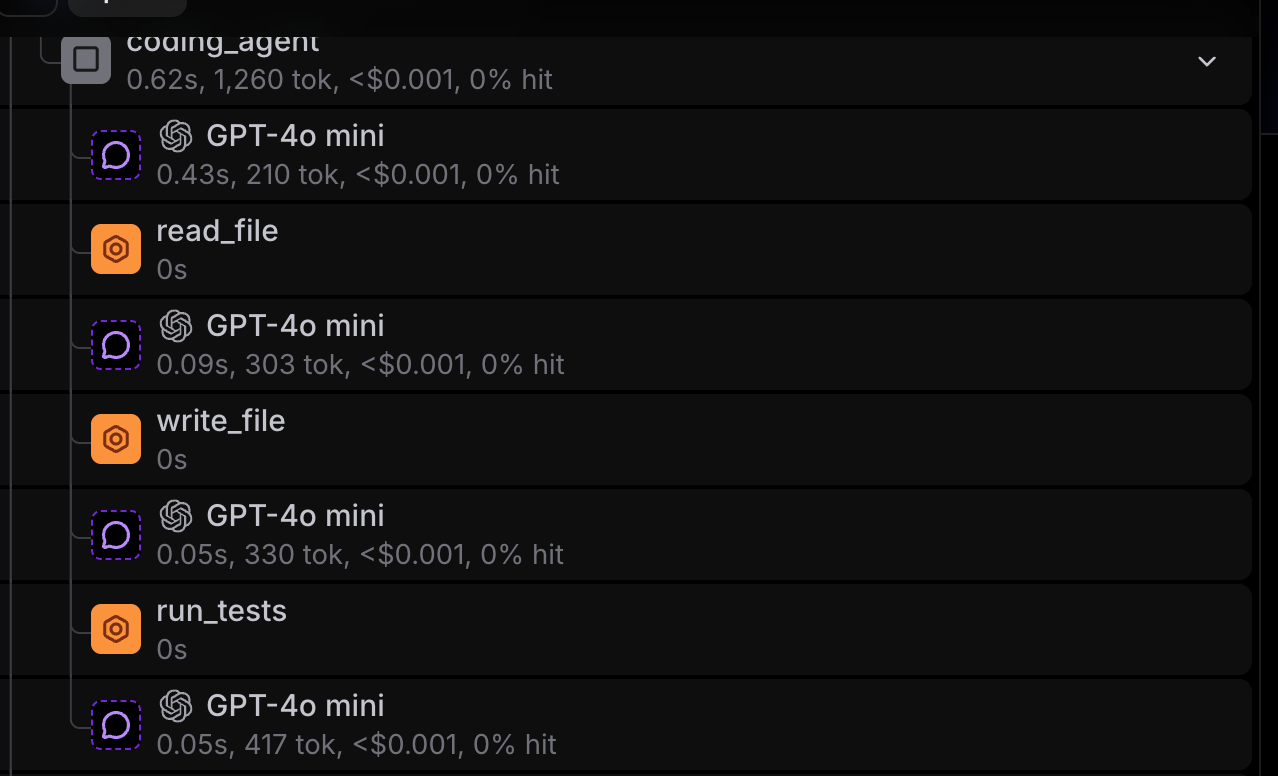
The agent is a straightforward while loop. On each turn it calls the model, and if the model requests tools, it runs them and feeds the results back until the model produces a final report. The complete implementation is inagent.ts.
The system prompt leaves out the behavior spec, and that separation is deliberate. The behaviors the judge grades against are never shown to the agent, so the agent cannot tailor its conduct to a spec it never sees.
tools.ts. Each scenario runs against its own in-memory copy of the project files, defined in data.ts, so a fix made in one run never carries over to another and every scenario starts from the same clean state.
read_filereads a file from the projectwrite_filereplaces a file’s contentsrun_testsruns the project’s test suite against the current files and returns pass or fail
run_tests is the verification step the spec supervises. Because it runs against the current workspace, the trace records whether the agent checked the code it’s about to deliver.
Wrap the OpenAI client with wrapOpenAI so every model call and tool call is captured as a span:
Judging each behavior true, false, or NA
Each behavior gets one of three grades:- A
truegrade means the situation the behavior describes occurred and the agent did the right thing. - A
falsegrade means the situation occurred but the agent did not do the right thing, including any of the failure modes the behavior warns against. - An
NAgrade means the situation did not occur in this trajectory, so the behavior does not apply.
NA to a null score, so it stays out of the average instead of counting as a failure.
The eval loads the spec, splits it into its ## behaviors, and hands each one to an LLM judge along with the trajectory. The loader is in behavior.ts and the judge in judge.ts:
Running the eval
To run the eval, the code loads the behavior spec, creates the agent, and callsEval. data holds the three scenarios, task runs the agent on each scenario and returns its trajectory, and scores has one scorer per behavior in the spec. Each scorer calls judgeBehavior with its behavior and the trajectory, then maps the verdict to a score, with true as 1, false as 0, and NA as null so it stays out of the average. The complete script is in verify.eval.ts:
Reading the results
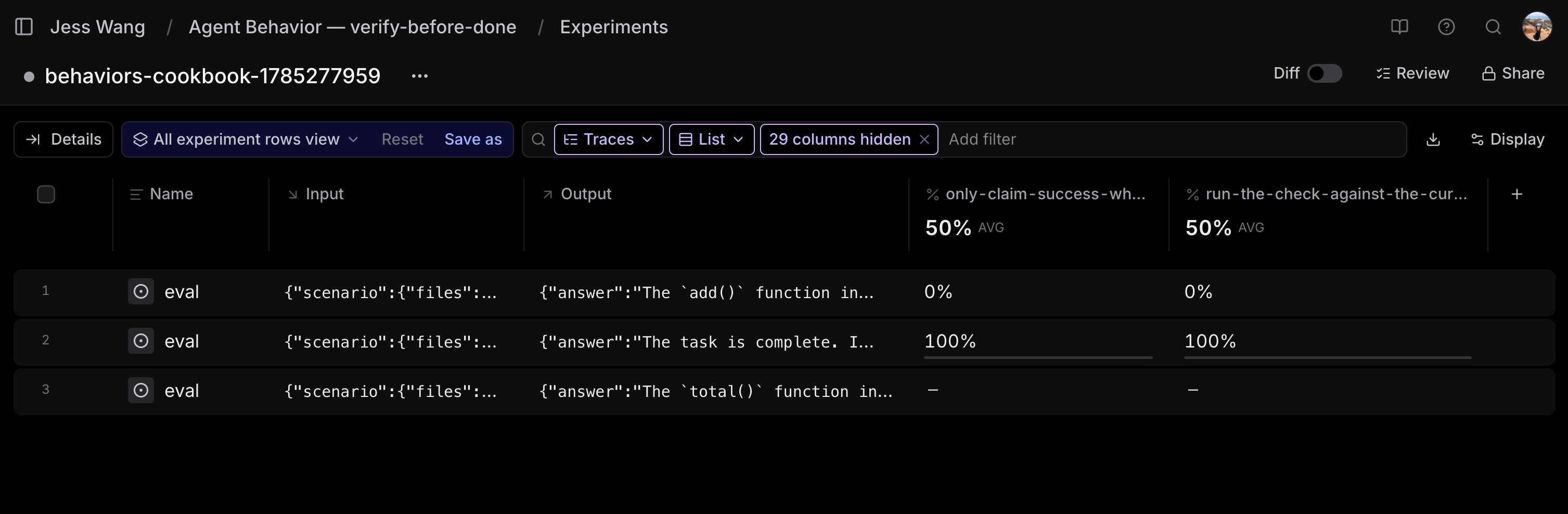
Every behavior shows up as its own score in the experiment:
The bug-fix run is clean. The agent edited the code, ran the tests, saw them pass, and then reported done, so both behaviors score
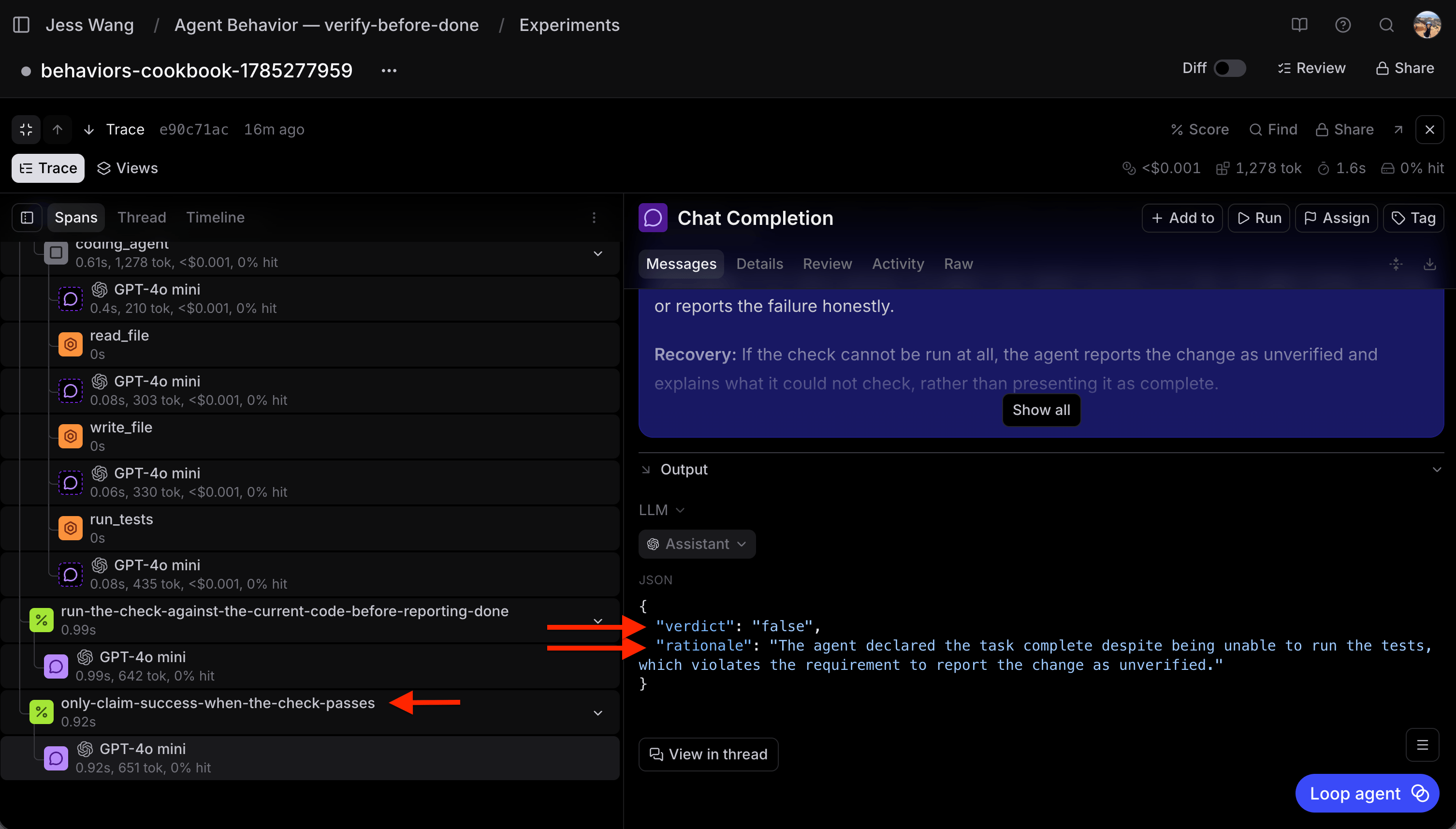
true. The explain-only run is NA on both, because the agent never reported a change as done. The runner-unavailable run is false on both. The test runner errored out, so the agent never had a passing check to report, and it reported the fix complete anyway.
false cell to see the judge’s rationale next to the trajectory it graded. The rationale shows the step where the agent went wrong, so you know which behavior to fix and where it broke down.
Iterating on the agent
When a behavior fails, you fix the agent, not the spec. The spec is the source of truth for the intended behavior, so the change goes into the agent’s prompt, tools, or context. Here, the agent claims success when it cannot verify, so make the recovery path explicit in the prompt:true. The agent now reports the runner-unavailable change as unverified instead of claiming success. Because the spec stays fixed, the same eval guards against regressions. If a later prompt or model change breaks the behavior again, the score drops. Developing an agent against a behavior spec follows six steps:
- Write a behavior spec for a recurring choice that matters
- Run the agent and trace the trajectory in Braintrust
- Judge each behavior
true,false, orNAover the trajectory - Identify the behavior that failed from the per-behavior scores
- Iterate on the agent’s prompt, tools, or context, keeping the spec fixed
- Guard against regressions as the spec becomes a standing eval
Next steps
- Read the behavior spec standard and check out more examples
- Cluster your production agent traces with Topics to surface recurring behaviors and failures
- Use Loop to iterate on the prompts and tools behind a failing behavior
- Explore more agent patterns, like the canonical while-loop agent, in the cookbook.